학생으로서 공부하는 입장이라, 잘못된 내용이 포함되있을 수 있습니다.
스프링 시큐리티 6.5.0 docs를 기반으로 작성하였습니다.
스프링 시큐리티를 이해하기 위해서 반드시 필터 개념을 알야합니다.
아래 글을 정독해주세요.
스프링 시큐리티 6 - 동작 원리(웹 요청과 필터)
학생으로서 공부하는 입장이라, 잘못된 내용이 포함되있을 수 있습니다. 웹 서버의 요청이 무엇인지 이해하고, 스프링 시큐리티6를 이해해봅시다! 스프링 시큐리티 6.5.0 docs를 기반으로 작성하
exit0null0.tistory.com
본 글을 이해하기 앞서 인증과 인가 그리고 지속 인증에 대해 알아야 합니다.
간단하게 정리한 글을 참고해주세요.
보안 - 인증과 인가 (지속 인증과 세션, JWT) 그리고 보안 조치들
요즘 같이 국가 기반 시설인 통신 인프라가 2022년부터 이미 보안이 뚤린 정황과 그것을 3년 지난 지금 겨우 알게된 것,그리고 다른 통신사 역시 동일하게 공격받았다는 정황이 포착되었다(공식
exit0null0.tistory.com
스프링 시큐리티의 기본 구성을 통해 어떻게 동작하는지 알아보자
스프링 시큐리티의 기본 구성은 "세션 기반 인증"을 전제한다.
Username/Password Authentication에 대해서 알아보자.
예제는 스프링 부트 3 with Kotlin, 스프링 시큐리티 6을 기반으로 테스트하였다.
프로젝트 종속성
- Spring Web
- Spring Security
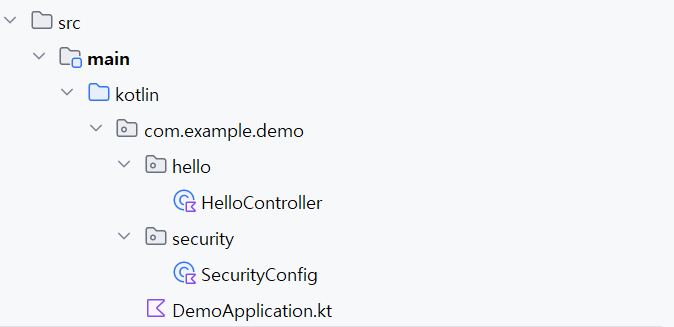
프로젝트에는 컨트롤러와 시큐리티 구성 코드만 작성했다.
HelloController
package com.example.demo.hello

import org.springframework.web.bind.annotation.GetMapping
import org.springframework.web.bind.annotation.RestController

@RestController
class HelloController() {
    @GetMapping("/hello")
    fun hello(): String {
        return "Hello, World!"
    }
}
SecurityConfig
공식 문서의 코틀린 예제가 문법의 문제로 동작하지 않아, 조금 수정했다.
package com.example.demo.security

import org.springframework.context.annotation.Bean
import org.springframework.context.annotation.Configuration
import org.springframework.security.config.annotation.web.builders.HttpSecurity
import org.springframework.security.config.annotation.web.configuration.EnableWebSecurity
import org.springframework.security.web.SecurityFilterChain

@Configuration
@EnableWebSecurity
class SecurityConfig {

    @Bean
    fun securityFilterChain(http: HttpSecurity): SecurityFilterChain {
        http
            .authorizeHttpRequests {
                it.anyRequest().authenticated()
            }
            .formLogin { }
            .httpBasic { }

        return http.build()
    }
}
https://docs.spring.io/spring-security/reference/6.5/servlet/authentication/passwords/index.html
이제 스프링 애플리케이션을 실행하자
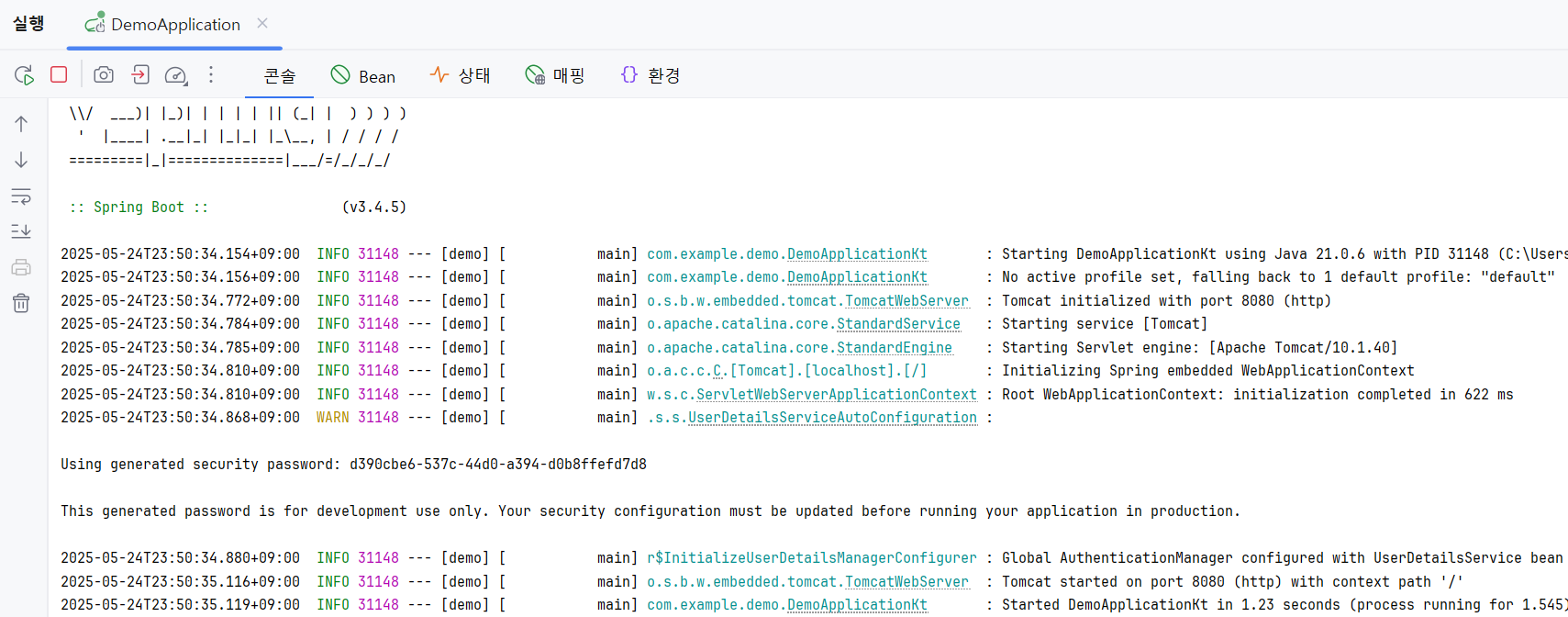
애플리케이션을 실행하면 콘솔 창에 다음과 같은 메시지가 출력되는 것을 확인할 수 있다
"Using generated security password: d390cbe6-537c-44d0-a394-d0b8ffefd7d8"
이 메시지는 스프링 시큐리티가 기본적으로 UserDetailsServiceAutoConfiguration을 통해 자동으로 사용자 인증 구성을 생성해주기 때문에 출력된다.
사용자 계정은 기본적으로 user, 비밀번호는 실행 시마다 자동으로 생성되며 콘솔에 출력된다.
이는 별도의 사용자 인증 설정을 하지 않았을 경우에만 적용되는 기본 동작이다.
초기 인증 요구
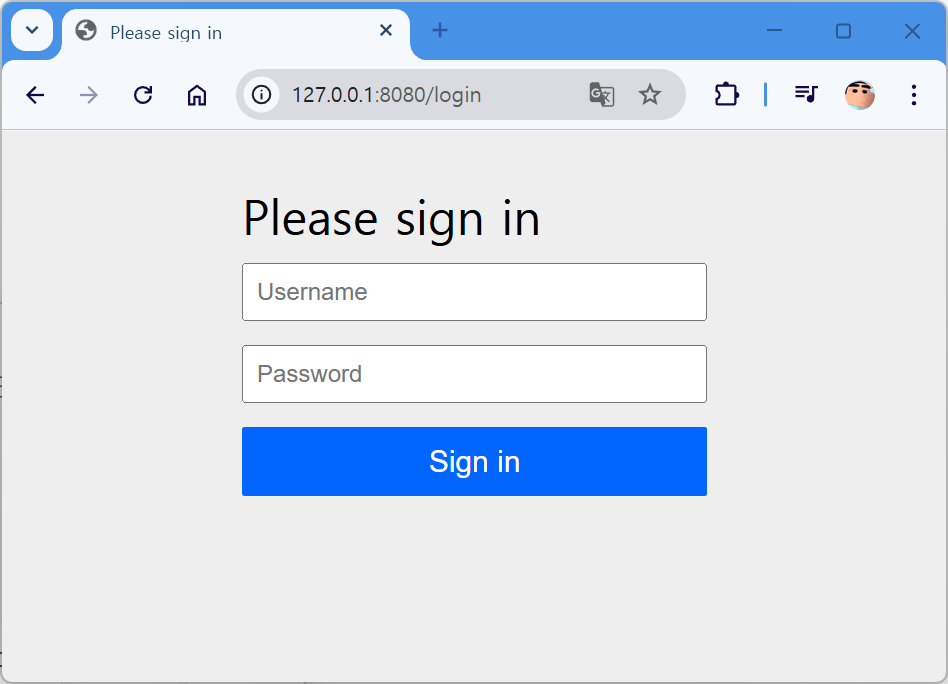
이제 브라우저에서 http://127.0.0.1:8080/hello에 접근해보자.
스프링 시큐리티는 기본적으로 로그인 페이지(html로써 GET /login)를 자동으로 구성하고,
인증이 필요한 요청이 들어오면 이 페이지로 리다이렉트한다.
따라서 위 URL에 접근하면 스프링 시큐리티가 자동으로 제공하는 로그인 화면이 나타나게 된다.
이는 내부적으로 /login에 대한 GET 요청을 처리하는 기본 로그인 폼이 매핑되어 있기 때문이다.
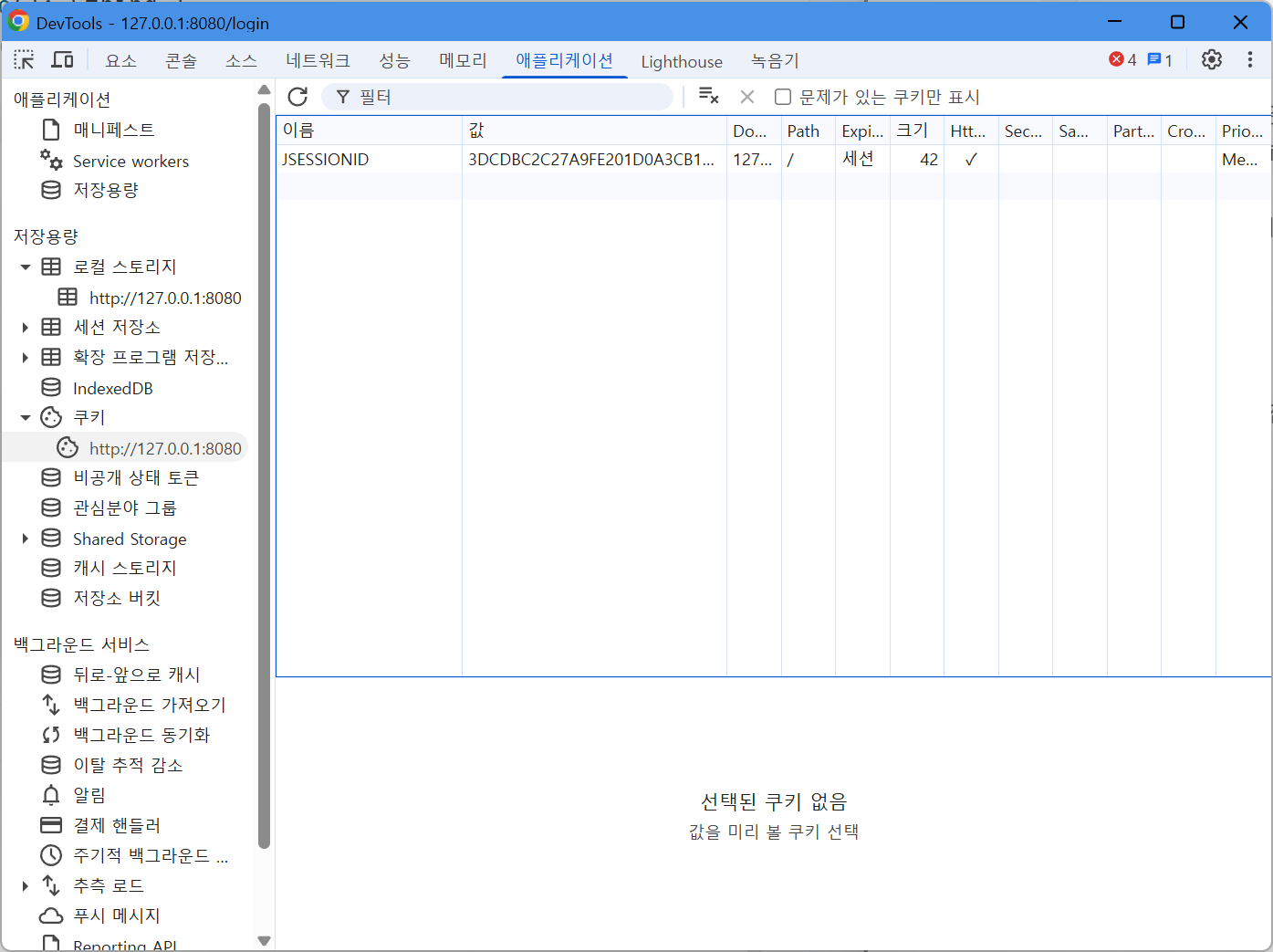
로그인 화면이 뜬 상태에서 브라우저의 개발자 도구에서 쿠키를 확인해보면,
JSESSIONID 쿠키가 이미 생성되어 있는 것을 볼 수 있다.
이는 스프링 시큐리티가 로그인하지 않은 사용자에게도 익명 인증(Anonymous Authentication)을 부여했기 때문이다.
관련 내용은 공식 문서에서도 확인할 수 있다
https://docs.spring.io/spring-security/reference/6.5/servlet/authentication/anonymous.html
이 상태의 세션은 아직 "로그인된 사용자"는 아니지만, 시큐리티는 모든 요청을 어떤 형태로든 인증된 객체로 처리하기 위해 내부적으로 익명 인증 객체를 생성한다.
초기 인증을 하고 난 후 벌어지는 일과 지속 인증
로그인 폼에서 다음과 같이 입력하면 인증이 완료된다
- Username: user
- Password: 콘솔에서 출력된 임시 비밀번호
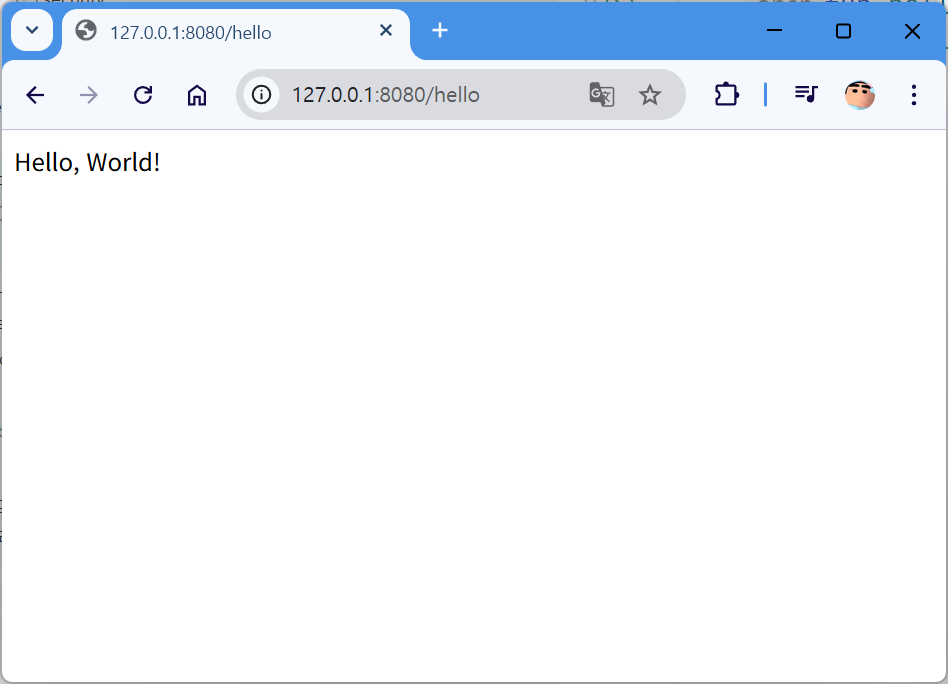
정상적으로 로그인에 성공하면 원래 요청했던 /hello 페이지로 리다이렉트된다.
이때 브라우저의 쿠키 정보를 다시 확인해보자.

JSESSIONID가 로그인 전과 다르게 변경된 것을 확인할 수 있다.
이는 로그인 전의 세션(익명 인증 기반 세션)이 종료되고, 새로운 세션이 생성되었기 때문이다.
이제 세션에는 실제 사용자 정보(UsernamePasswordAuthentication)가 포함되며,
스프링 시큐리티는 해당 세션을 기준으로 "지속 인증"을 하게 된다.
이 개념은 보안 - 인증과 인가 (지속 인증과 세션, JWT) 그리고 보안 조치들에 정리해 두었으니 반드시 참고하자.
인증 삭제, 로그아웃

이제 브라우저에서 http://127.0.0.1:8080/logout에 접근해보자.
로그아웃을 하겠냐는 선택지가 나온다.
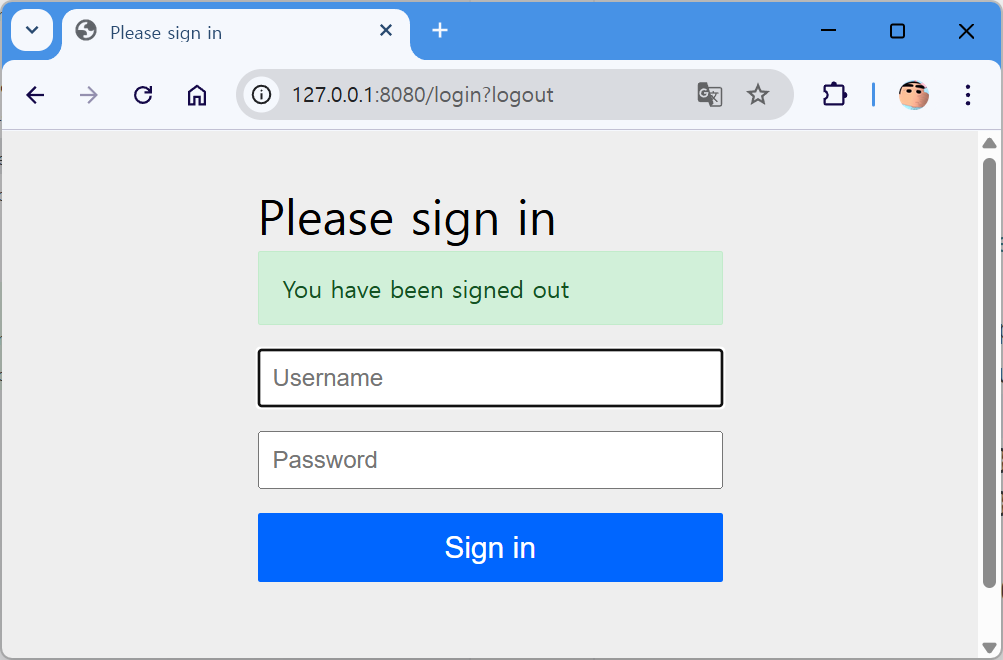
로그아웃을 완료하게 된다면

JSESSIONID가 삭제가 되고 다시 리다이렉트 되면서, JSESSIONID가 생겨난다.
JSESSIONID는 로그인 후와 다르게 변경된 것을 확인할 수 있다.
이는 로그인 세션(UsernamePassword 기반 세션)이 종료되고, 익명 세션이 생성되었기 때문이다.
어떻게 동작하는지 필터 단위에서 알아보자
[스프링시큐리티6] 동작 원리(웹 요청과 필터) 글에서 스프링 시큐리티는 필터 단위로 동작한다고 언급했다.
그리고 스프링 시큐리티 필터 체인은 DelegatingFilterProxy에 의해 주입된다고 언급했다.
org.springframework.security.web의 FilterChainProxy 클래스에 브레이크 포인트를 걸면 어떻게 동작하는지 확인할 수 있다.
(프레임워크에서 디버깅하는 건 쉽지 않은데, 인증 방식이 Username Password임에 힌트를 얻어서 UsernamePasswordAuthenticationFilter에 브레이크 포인트를 걸어 찾아낸 객체이다)
FilterChainProxy를 중심으로 동작 흐름을 추적해보자
스프링 시큐리티의 보안 처리 로직은 서블릿 요청의 가장 앞단에서 FilterChainProxy를 통해 시작된다.
이를 더 명확히 이해하기 위해, FilterChainProxy의 doFilter 메서드에 브레이크포인트를 설정한 뒤 디버깅 모드로 애플리케이션을 실행해보자.
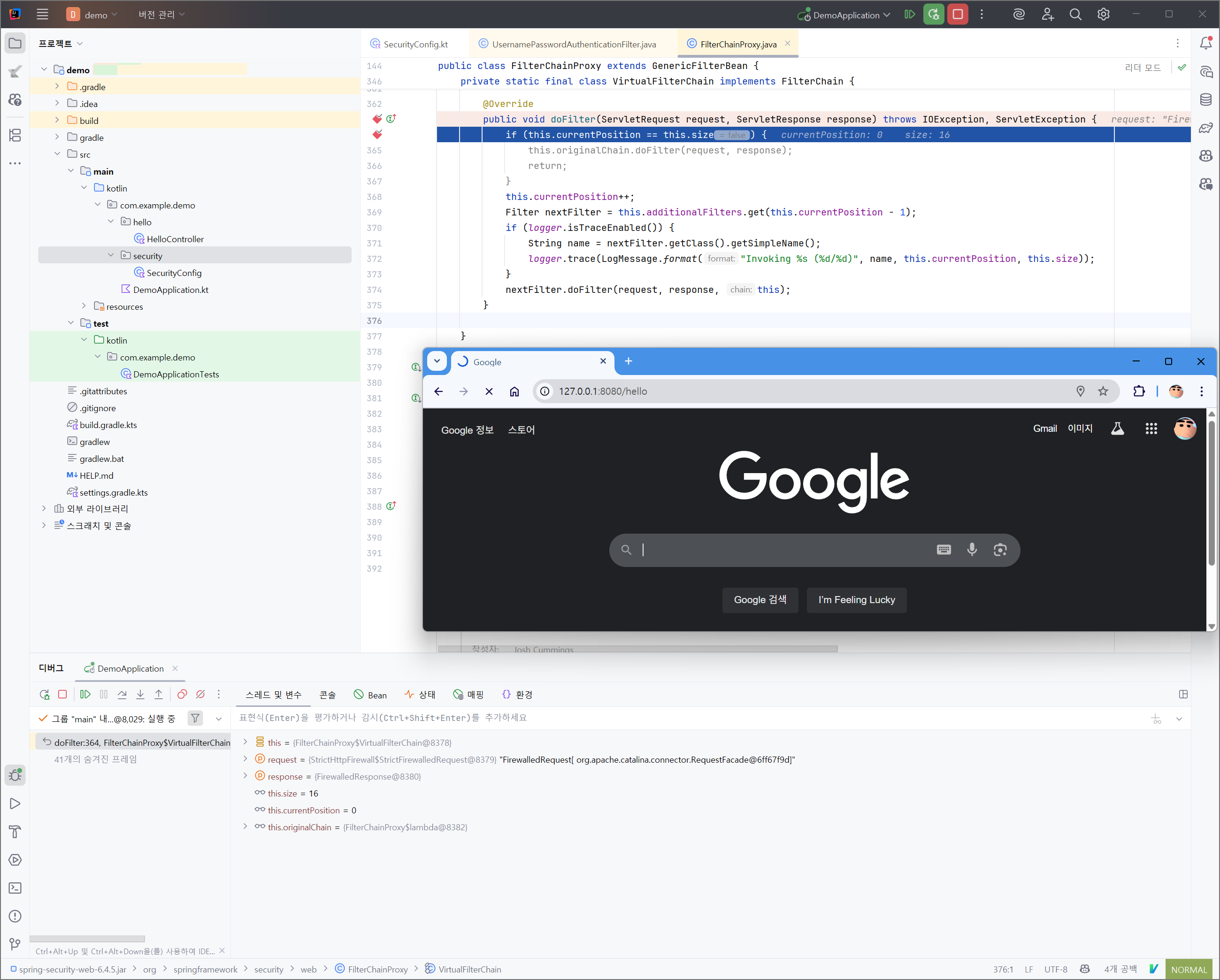
이 상태에서 클라이언트가 어떤 요청이든 전송하게 되면, 요청은 다음의 순서로 처리된다
요청(Request) → 필터(Filter) → 인터셉터(Interceptor) → 서블릿(Servlet)
그리고 이 흐름의 필터 단계에서,
스프링 시큐리티의 FilterChainProxy에 도달하게 되며,
브레이크포인트에서 실행이 잠시 멈추게 된다.
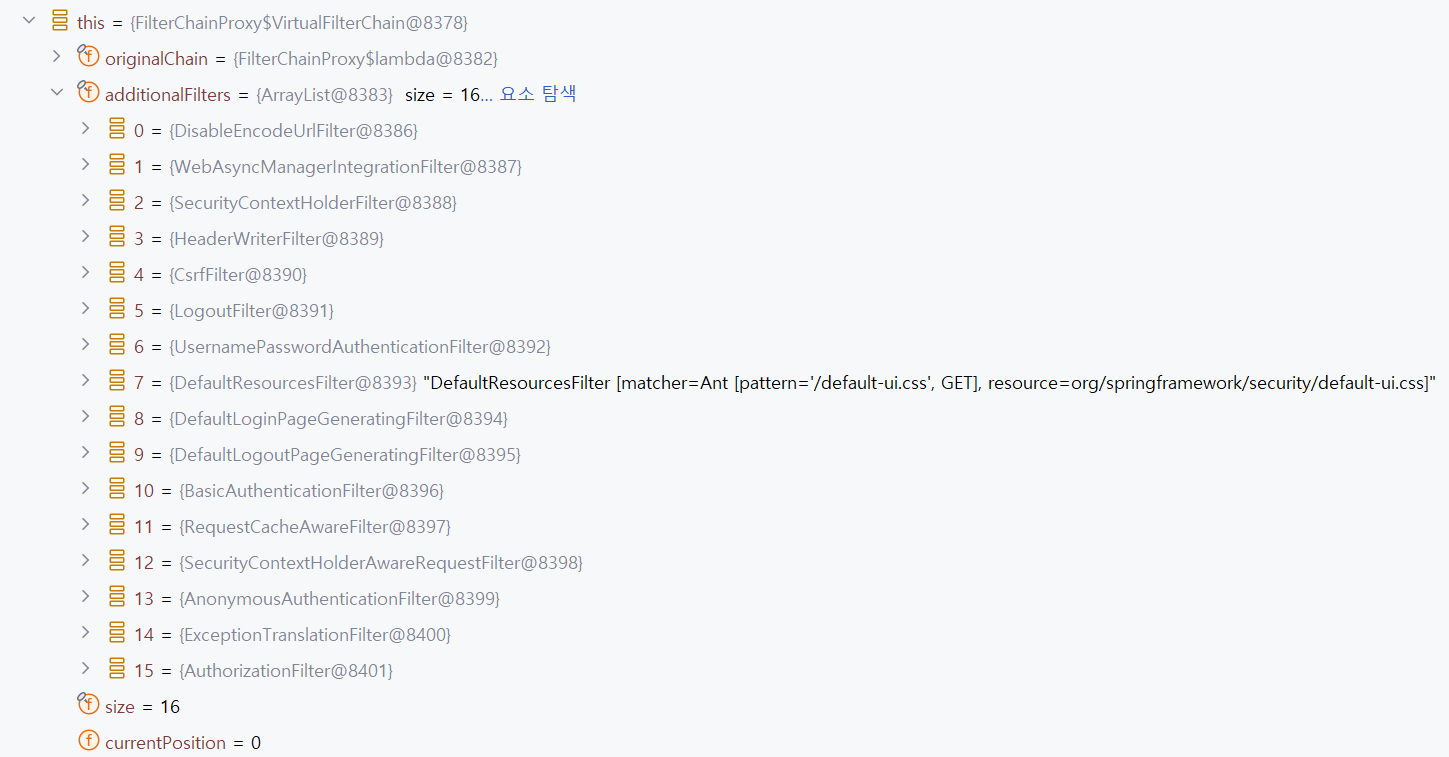
별도의 구성 없이 기본 설정만 적용하더라도,
스프링 시큐리티는 총 16개의 필터를 SecurityFilterChain 내에 자동으로 주입하여 동작시킨다.
스프링 시큐리티의 필터 체인은 순차적으로 실행되며,
각 필터는 자신의 처리를 마친 후 다음 필터로 흐름을 넘기는 방식으로 동작한다.
즉, HTTP 요청이 들어오면 다음과 같은 순서로 필터들이 처리하게 된다.
이 아래의 필터들이 주요한 인증 로직이다.
SecurityContextHolderFilter -> LogoutFilter -> UsernamePasswordAuthenticationFilter -> AnonymousAuthenticationFilter
시큐리티의 SecurityContext와 Authentication 객체가 무엇일까?
스프링은 컨텍스트라는 말을 굉장히 좋아한다.
단순히 '문맥' 정도로 번역되는 이 단어는 스프링의 핵심 철학인 제어의 역전(IoC, Inversion of Control)을 기반으로 하는 객체지향 구조 내에서, 애플리케이션의 특정 상태나 환경을 정의하고 관리하는 객체라는 의미로 사용된다.
한마디로, 우리 애플리케이션의 문맥(상태보다 좀더 상위 개념)이다!
우리의 상태가 이렇게 되어있다를 의미한다로 생각하면 된다.
객체지향과 프레임워크가 어떻게 돌아가는지 공부하면 이해할수 있다.
(아래글 참고)
- https://stackoverflow.com/questions/58245160/what-is-the-meaning-of-context-in-spring
- https://medium.com/@metinoktayboz/spring-framework-the-context-english-6c0adc17566b
SeucurityContext가 무엇이냐?
Authentication 객체를 담고 있는 문맥이라고 생각하면 된다.
SeucurityContext가 비어있다면?
Authentication 객체가 없기 때문에 인증을 못받았다고 인지한다.
Authentication가 스프링 시큐리티 내에서 인증과 인가에 대한 통행증으로써 쓰인다.

이 그림이, 이 인증 관련 객체를 모두 잘 나타내주고 있다.
SeucurityContextHolder가 SeucurityContext를 품고 있는 객체이고
SeucurityContext가 Authentication을 품고 있는 객체이다.
Authentication에 저장되는 정보는 크게 3가지가 있다(더있긴 하다).
- Principal: 인증받는 주체의 신원이다. 사용자 아이디와 비밀번호를 사용하는 인증 요청의 경우 사용자 아이디가 된다. 호출자는 인증 요청에 대해 주체를 입력해야 한다. AuthenticationManager 구현은 종종 애플리케이션에서 사용할 주체로 더 풍부한 정보를 포함하는 인증을 반환한다. 대부분의 AuthenticationProvider는 UserDetails 객체를 주체로 생성한다.
- Credentials: 주체가 올바른지 증명하는 자격증명이다. 일반적으로 비밀번호이지만 AuthenticationManager와 관련된 모든 것이 될 수 있다. 호출자는 자격 증명을 입력해야 한다.
- Authorities: 인증 관리자가 설정하여 본인에게 부여된 권한을 나타낸다. 클래스는 신뢰할 수 있는 AuthenticationManager가 설정하지 않는 한 이 값이 유효한 것으로 의존해서는 안 된다. 구현은 반환된 컬렉션 배열의 수정이 인증 객체의 상태에 영향을 미치지 않도록 하거나 수정할 수 없는 인스턴스를 사용해야 한다.
더 자세한 정보는 아래의 class API 문서를 참고
시큐리티가 Authentication로 인증을 처리하는 방법
실제 서비스를 구현하는 단계에서는 Authentication에 저장되는 정보를 정확히 이해하는 것이 중요하지만,
공부하는 입장에서는 너무 복잡하게 받아들일 필요는 없다.
핵심적으로 기억해야 할 점은 다음과 같다.
Authentication는 통행증이다!
하지만 같은 Authentication이라는 이름을 가지고 있다고 하더라도,
서로 다른 목적과 역할을 수행하게 된다.
예를 들어, 사용자가 로그인하기 위해 아이디와 비밀번호를 제출한다고 가정하자.
이때 이 정보를 담고 있는 Authentication 객체는 아직 인증되지 않은 상태이며,
이는 단지 “인증을 시도하기 위한 정보”일 뿐이다.
인증을 시도하기 위한 정보는 UsernamePasswordAuthenticationFilter와 같은 인증 필터를 통해 만들어지며,
인증을 처리하는 AuthenticationProvider에게 전달된다.
AuthenticationProvider는 이 객체 안에 담긴 정보를 바탕으로,
해당 아이디와 비밀번호가 실제 존재하는 사용자 정보와 일치하는지를 검증한다.
검증이 완료되면, 해당 사용자 정보를 담은 새로운 Authentication 객체를 생성한다.
이때는 보통 UserDetails를 내부에 포함하고 있으며, 이 객체는 이제 “인증이 완료된 상태”를 의미한다.
위에서 Principal 설명을 보면, AuthenticationProvider가 주로 UserDetails를 포함하고 있다는 말이 이것이다.
정리해보자면,
- 로그인 요청 시 전달되는 Authentication (isAuthenticated() → false)
- 인증이 성공한 후 반환되는 Authentication (isAuthenticated() → true)
같은 타입의 Authentication 인터페이스를 구현하지만(예를들면 UsernamePasswordAuthenticationToken가 있다), 동일한 객체인데도 불구하고, 인증이 되어있음과 안되어있음으로 나뉘어져있다고 이해하면 된다.
스프링 시큐리티는 SecurityContext에 인증이 성공한 후 반환되는 Authentication가 저장되어있다면 인증이 되었다고 간주한다.
코드로 보는 인증 필터 동작

사실 아까 위에서 설명한 인증 과정이 이 그림으로 정리된다.
AbstractAuthenticationProcessingFilter가 인증을 담당하는 필터이다.
이 추상 클래스를 실제로 구현한 것이
시큐리티 기본 구성에서 보았던 UsernamePasswordAuthenticationFilter 필터이다.
아래는 AbstractAuthenticationProcessingFilter의 동작 코드이다.
	private void doFilter(HttpServletRequest request, HttpServletResponse response, FilterChain chain)
			throws IOException, ServletException {
		if (!requiresAuthentication(request, response)) {
			chain.doFilter(request, response);
			return;
		}
		try {
			Authentication authenticationResult = attemptAuthentication(request, response);
			if (authenticationResult == null) {
				if (this.continueChainWhenNoAuthenticationResult) {
					chain.doFilter(request, response);
					return;
				}
				// return immediately as subclass has indicated that it hasn't completed
				return;
			}
			this.sessionStrategy.onAuthentication(authenticationResult, request, response);
			// Authentication success
			if (this.continueChainBeforeSuccessfulAuthentication) {
				chain.doFilter(request, response);
			}
			successfulAuthentication(request, response, chain, authenticationResult);
		}
		catch (InternalAuthenticationServiceException failed) {
			this.logger.error("An internal error occurred while trying to authenticate the user.", failed);
			unsuccessfulAuthentication(request, response, failed);
		}
		catch (AuthenticationException ex) {
			// Authentication failed
			unsuccessfulAuthentication(request, response, ex);
		}
	}
이 필터는 요청을 처리하는 데 있어,
requiresAuthentication() 메서드로 특정 URL 경로와 HTTP 메서드에 대해서만 동작하도록 제한한다.
예를 들어, /login 경로에 대해 POST 요청이 들어왔을 때만 이 필터가 실행되도록 설정할 수 있으며,
그 외의 요청에는 작동하지 않도록 구성할 수 있다, 또는 모든 경로에 요청을 들어오게 할수도 있다.
참고로 스프링 시큐리티에서 jwt 관련해서 구현해보고 싶다면
스프링 시큐리티의 공식 구현체인 OAuth2를 참고해보는 걸 추천한다.
시큐리티의 기본 구성 구현체로 보는 인증 처리
아래 필터로 예시를 들어보겠다.
SecurityContextHolderFilter -> LogoutFilter -> UsernamePasswordAuthenticationFilter -> AnonymousAuthenticationFilter
SecurityContextHolderFilter
- 현재 요청의 JSESSIONID 쿠키에 해당하는 세션 정보가 SecurityContextRepository에 존재할 경우, 그 레포지토리에서 Authentication 객체를 불러와 SecurityContext에 저장한다. SecurityContext에 저장되면 다음 필터들의 인증 및 인가를 처리할 때 사용한다. 또한 하나의 요청이 끝날 때 SecurityContext를 지워주는 역할을 한다.
LogoutFilter
- 요청이 로그아웃 URL에 해당할 경우 동작하며, 사용자 세션 정보를 제거하고 JSESSIONID 쿠키를 삭제함으로써 로그아웃 처리를 수행한다.
UsernamePasswordAuthenticationFilter
- 로그인 요청이 들어오면, 사용자가 입력한 ID와 비밀번호를 Authentication 객체에 담아 AuthenticationProvider에 전달하여 인증을 수행한다. 인증이 성공하면 인증된 Authentication 객체가 SecurityContext에 저장되며, 이와 동시에 세션(레포지토리)에도 저장된다.
AnonymousAuthenticationFilter
- 앞선 모든 필터를 거쳤음에도 불구하고 SecurityContext에 인증 정보가 존재하지 않을 경우, 익명 사용자를 위한 Authentication 객체를 생성하여 SecurityContext에 저장한다. 이로써 인증되지 않은 사용자도 일정 수준의 접근이 가능하도록 한다.
이러한 필터들은 순차적으로 동작하며, 요청이 처리되는 과정에서 인증 상태를 결정짓는 중요한 역할을 한다.
SecurityContextHolderFilter
요청이 들어왔을때, 가장 먼저 처리되는 SecurityContextHolderFilter는 Persisting Authentication을 담당한다.
Persisting Authentication는 영속 인증 또는 지속 인증이라고 말할수 있겠다.
지속 인증에 대한 건 지난 번 글에 설명해두었기 때문에 넘어가도록 하겠다.
사용자의 요청에 포함된 JSESSIONID 쿠키에 해당하는 세션 정보가 SecurityContextRepository에 존재하면,
저장된 Authentication을 불러와서 SecurityContext에 담는 역할을 한다.
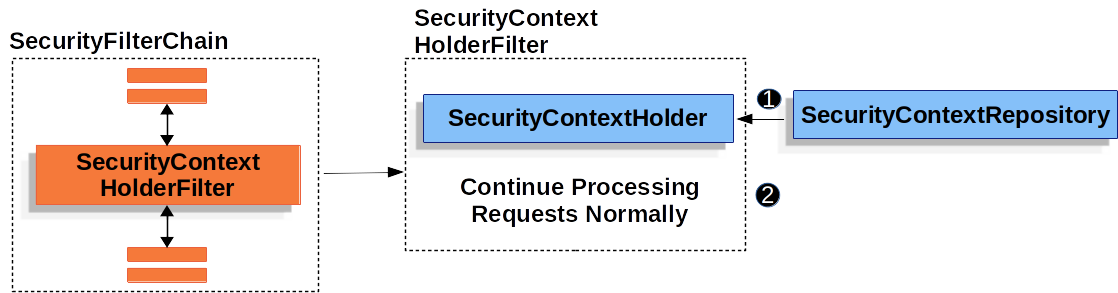
복잡하게 보이지만, 이 필터가 하는 역할을 아주 잘 나타내고 있다.
1. 사용자의 요청에 포함된 JSESSIONID 쿠키를 확인한다.
2. JSESSIONID와 매핑된 인증 정보가 서버의 레포지토리에 저장되어 있는가?
3-1. 저장되어 있다. 인증된 Authentication 객체를 가져와서 SecurityContext에 저장한다.
3-2. 저장되어 있지 않다. 아무것도 하지 않고 다음 필터로 넘어간다.
4. 하나의 요청이 끝나면, SecurityContext를 초기화 한다(그 이유는 아래에 서술).
아래는 필터의 실제 코드이다.
    private void doFilter(HttpServletRequest request, HttpServletResponse response, FilterChain chain) throws ServletException, IOException {
        if (request.getAttribute(FILTER_APPLIED) != null) {
            chain.doFilter(request, response);
        } else {
            request.setAttribute(FILTER_APPLIED, Boolean.TRUE);
            Supplier<SecurityContext> deferredContext = this.securityContextRepository.loadDeferredContext(request);

            try {
                this.securityContextHolderStrategy.setDeferredContext(deferredContext);
                chain.doFilter(request, response);
            } finally {
                this.securityContextHolderStrategy.clearContext();
                request.removeAttribute(FILTER_APPLIED);
            }

        }
    }
try가 끝나고 난후, finally에서 clearContext를 진행한다.
그니까 SecurityContextHolderFilter가 시큐리티 인증에 대한 가장 처음 필터로써
다음 필터들의 모든 필터의 작업이 끝나고 최종적으로 컨트롤러에 도착하고 난 후, SecurityContext를 비우는 역할을 한다.
마지막까지 SecurityContextHolder를 책임지기 때문에 이 필터 이름이 SecurityContextHolderFilter인 것 같다.
스프링 시큐리티의 SecurityContextHolder는 기본적으로 ThreadLocal을 기반으로 동작한다.
이는 각 요청을 처리하는 스레드에 인증 정보를 임시로 저장하는 구조인데, 스프링 MVC는 요청을 처리할 때 매번 새로운 스레드를 생성하지 않고, 재사용 가능한 쓰레드 풀(ThreadPool) 을 사용한다.
이러한 구조에서 만약 요청이 끝난 후에도 SecurityContext가 남아 있다면, 해당 스레드가 다음 요청을 처리할 때 이전 사용자의 인증 정보가 그대로 남아 있을 수 있다.
이 경우 서로 다른 사용자 요청 간에 보안 컨텍스트가 충돌할 수 있으며, 이는 심각한 보안 사고로 이어질 수 있다.
더 자세히 알아보고 싶다면, 아래의 글 참고
참고로, 아래 글은 SecurityContextPersistenceFilter를 설명했는데,
스프링 시큐리티 6부터는 SecurityContextPersistenceFilter가 deprecated되고 SecurityContextHolderFilter로 새롭게 변경되었다. 큰 차이는 없으니 이해하는데 어려움은 없을 것이다.
LogoutFilter
로그아웃은 http 세션을 무효화(레포지토리에 세션 삭제, 클라이언트의 JSESSIONID 쿠키 삭제)한다.
그외 여러 작업들이 있으니 아래 내용 참고하자.
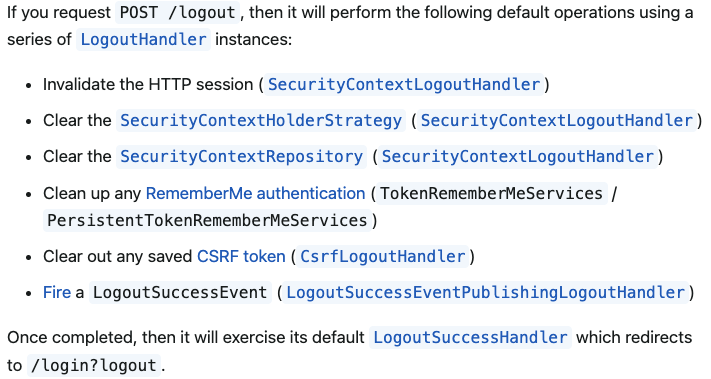
아래는 로그아웃 필터의 구현체이다.
	private void doFilter(HttpServletRequest request, HttpServletResponse response, FilterChain chain)
			throws IOException, ServletException {
		if (requiresLogout(request, response)) {
			Authentication auth = this.securityContextHolderStrategy.getContext().getAuthentication();
			if (this.logger.isDebugEnabled()) {
				this.logger.debug(LogMessage.format("Logging out [%s]", auth));
			}
			this.handler.logout(request, response, auth);
			this.logoutSuccessHandler.onLogoutSuccess(request, response, auth);
			return;
		}
		chain.doFilter(request, response);
	}
아래는 handler.logout()의 구현체이다.
	public void logout(HttpServletRequest request, HttpServletResponse response, Authentication authentication) {
		Assert.notNull(request, "HttpServletRequest required");
		if (this.invalidateHttpSession) {
			HttpSession session = request.getSession(false);
			if (session != null) {
				session.invalidate();
				if (this.logger.isDebugEnabled()) {
					this.logger.debug(LogMessage.format("Invalidated session %s", session.getId()));
				}
			}
		}
		SecurityContext context = this.securityContextHolderStrategy.getContext();
		this.securityContextHolderStrategy.clearContext();
		if (this.clearAuthentication) {
			context.setAuthentication(null);
		}
		SecurityContext emptyContext = this.securityContextHolderStrategy.createEmptyContext();
		this.securityContextRepository.saveContext(emptyContext, request, response);
	}
저기 session.invalidate()라는 코드에서 쿠키를 지운다고 보면 된다.
더 자세한건 아래 코드를 참고... invalidate 함수는 expire 함수를 호출하고 있다
(객체지향의 매우 큰 단점이라고 할 수 있는게, 동작하는 코드를 보고 싶어도 모두 인터페이스로 되어있어서 실제 구현체를 찾기 애먹었다.)
스프링 시큐리티가 session이 어떻게 생성되는지 알고 싶다면 아래 글을 참고하자
코드를 매우 잘 뜯어보고 계신다.
UsernamePasswordAuthenticationFilter
위에서 간단하게 설명한 인증 필터이다.
UsernamePasswordAuthenticationFilter는 AbstractAuthenticationProcessingFilter를 상속받았다.
AbstractAuthenticationProcessingFilter가 doFilter로 기본 동작이 구현되어 있고 attemptAuthentication는 추상 메서드이다.
AbstractAuthenticationProcessingFilter을 상속받고 attemptAuthentication 인증 로직을 완성해야한다.
즉, UsernamePasswordAuthenticationFilter는 attemptAuthentication를 미리 구현해 놓은 AbstractAuthenticationProcessingFilter의 구현체라고 보면 된다.
다음은 AbstractAuthenticationProcessingFilter의 doFilter이다.
private void doFilter(HttpServletRequest request, HttpServletResponse response, FilterChain chain)
			throws IOException, ServletException {
		if (!requiresAuthentication(request, response)) {
			chain.doFilter(request, response);
			return;
		}
		try {
			Authentication authenticationResult = attemptAuthentication(request, response);
			if (authenticationResult == null) {
				if (this.continueChainWhenNoAuthenticationResult) {
					chain.doFilter(request, response);
					return;
				}
				// return immediately as subclass has indicated that it hasn't completed
				return;
			}
			this.sessionStrategy.onAuthentication(authenticationResult, request, response);
			// Authentication success
			if (this.continueChainBeforeSuccessfulAuthentication) {
				chain.doFilter(request, response);
			}
			successfulAuthentication(request, response, chain, authenticationResult);
		}
		catch (InternalAuthenticationServiceException failed) {
			this.logger.error("An internal error occurred while trying to authenticate the user.", failed);
			unsuccessfulAuthentication(request, response, failed);
		}
		catch (AuthenticationException ex) {
			// Authentication failed
			unsuccessfulAuthentication(request, response, ex);
		}
	}
요청 url을 확인후 조건에 맞으면 attemptAuthentication을 실행한다.
attemptAuthentication는 전달된 요청으로부터 아이디와 비밀번호를 추출하고, 이를 통해 AuthenticationManager에게 인증을 위임한다. 인증에 성공하면, isAuthenticated가 true로 설정된 Authentication 객체가 반환된다.
이후 문제가 없다면, sessionStrategy를 통해 인증 정보를 세션에 저장하게 된다.
이 과정을 단순히 말하자면,
인증에 성공한 사용자의 정보를 서버 세션에 저장하고,
클라이언트에는 이를 식별할 수 있는 JSESSIONID 쿠키를 발급하는 흐름으로 이해해도 무방하다.
이 세션 전략(sessionStrategy)이 무엇인지 궁금하다면 아래 글 참고
successfulAuthentication는 굳이 코드를 보여주진 않겠지만,
Authentication을 SecurityContextHolderFilter에서 불러오는 레포지토리에 저장하는 코드가 있다.
즉, 여기에서 세션이 저장된다고 보면 된다.
다음은 UsernamePasswordAuthenticationFilter의 attemptAuthentication이다.
	public Authentication attemptAuthentication(HttpServletRequest request, HttpServletResponse response)
			throws AuthenticationException {
		if (this.postOnly && !request.getMethod().equals("POST")) {
			throw new AuthenticationServiceException("Authentication method not supported: " + request.getMethod());
		}
		String username = obtainUsername(request);
		username = (username != null) ? username.trim() : "";
		String password = obtainPassword(request);
		password = (password != null) ? password : "";
		UsernamePasswordAuthenticationToken authRequest = UsernamePasswordAuthenticationToken.unauthenticated(username,
				password);
		// Allow subclasses to set the "details" property
		setDetails(request, authRequest);
		return this.getAuthenticationManager().authenticate(authRequest);
	}
UsernamePasswordAuthenticationFilter에서 크게 봐야하는 부분은 두가지이다.
1. postOnly 설정과 보안상의 이유
postOnly가 켜져있으면 POST 요청만 허용한다.
그 이유는 단순한데, GET요청은 보안상 좋지 않기 때문이다(CSRF via GET).
GET 요청은 본래 서버의 상태를 변경하지 않는 안전한 요청이라는 의미를 담고 있으며, 멱등성을 보장해야 한다. 따라서 일반적인 클라이언트나 브라우저는 GET 요청이 서버 자원에 영향을 미치지 않는다고 전제하고 동작하게 된다.
하지만 만약 서버가 이러한 GET 요청을 통해 상태를 변경하도록 구현되어 있다면, 이는 보안상 매우 취약한 구조가 된다. 클라이언트가 GET 요청을 신뢰하는 특성을 악용하여, 공격자는 CSRF(Cross-Site Request Forgery)와 같은 방식으로 인증 없이도 사용자의 행위를 가장할 수 있게 된다.
결과적으로, 사용자가 의도하지 않은 요청이 서버에 전달되더라도 클라이언트는 이를 정상적인 트래픽으로 간주하게 되며, 이는 곧 심각한 보안 위협으로 이어질 수 있다. 이러한 이유로 인증 요청은 반드시 POST 방식으로 제한되어야 하며, UsernamePasswordAuthenticationFilter가 GET을 허용하지 않는 이유도 여기에 있다.
2. UsernamePasswordAuthenticationToken의 생성과 인증 과정
이 객체는 사용자의 아이디(username)와 비밀번호(password)를 담는 Authentication 구현체이다.
이 시점에서 생성된 토큰의 isAuthenticated 속성은 false로 설정된다.
이는 아직 인증이 완료되지 않았음을 의미한다.
이후 이 토큰은 다음과 같은 과정을 거친다
return this.getAuthenticationManager().authenticate(authRequest);AuthenticationManager는 전달받은 인증 요청을 내부적으로 AuthenticationProvider에게 위임하여 처리한다.
스프링 시큐리티의 기본 구성에서 AuthenticationProvider의 구현체는 AbstractUserDetailsAuthenticationProvider이다.
크게 이렇게 동작한다.
- 전달받은 사용자 이름으로 유저 정보를 조회
- 비밀번호 일치 여부를 확인
- 인증이 성공하면, 내부에 UserDetails를 포함한 Authentication 객체를 반환하며 isAuthenticated는 true로 설정됨
UsernamePasswordAuthenticationFilter에 대해 정리하자면,
- AbstractAuthenticationProcessingFilter는 특정 URL에 대한 요청만 조건적으로 수행한다.
- AbstractAuthenticationProcessingFilter에 기본 동작이 정의되어 있고 attemptAuthentication에서 세부적인 인증 과정을 구현해야 한다.
- UsernamePasswordAuthenticationFilter는 Username과 Password 처리에 특화된 AbstractAuthenticationProcessingFilter의 구현체이다.
- UsernamePasswordAuthenticationFilter는 보안상의 이유로 POST 요청만 허용하게끔 하여 GET은 차단할수 있다.
- 필터에서 사용자에 관한 아이디와 비밀번호를 추출하여 이를 AuthenticationProvider에게 인증하게 넘긴다.
- 사용자의 인증 정보는 UsernamePasswordAuthenticationToken에 담기며, 이 객체는 인증되지 않은 상태로 생성된다.
- 이후 AuthenticationManager가 이를 받아 AuthenticationProvider에게 인증을 위임한다.
- 인증이 성공하면, 인증된 상태의 Authentication 객체가 반환된다.
결론
음,,, 최대한 쉽게 글로 정리해 보려고 했지만,
스프링 시큐리티는 여전히 매우 방대하고 어렵다(공식 문서도 매우 불친절해서 욕이 나온다).
객체지향의 특징이 그대로 보이는 구조라서 이해하는데 어려움이 많을 것이다.
예를들어 IoC 구조 때문인지, 실제 구현체가 아닌 interface인 껍데기가 많다.
인텔리제이에서 디버깅을 해보며, 코드를 따라가는게 좋을 것이다.
그리고 코드를 읽는 습관이 매우 중요하다...
이 내용들은 공식 문서 설명으로 이해할수 있는 것이 아니다.
직접 코드를 보며, 왜 저렇게 동작하는지 이해하는것이 더 낫다.
'개발 > 스프링 시큐리티' 카테고리의 다른 글
| 스프링 시큐리티6 동작 원리(웹 요청과 필터) (4) | 2025.05.24 |
|---|